Content Filter
Camel supports the Content Filter from the EIP patterns using one of the following mechanisms in the routing logic to transform content from the inbound message.
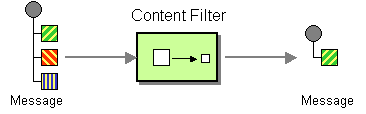
-
Using a Message Translator
-
Invoking a Bean with the filtering programmed in Java
-
Using a Processor with the filtering programmed in Java
-
Using an Expression
Message Content filtering using a Processor
In this example, we add our own Processor using explicit Java to filter the message:
from("direct:start")
    .process(new Processor() {
        public void process(Exchange exchange) {
            String body = exchange.getMessage().getBody(String.class);
            // do something with the body
            // and replace it back
            exchange.getMessage().setBody(body);
        }
    })
    .to("mock:result");
In the Java code above we used an inlined Processor which is harder to do with XML or YAML DSL. A good practice is to use a class for your custom Processor which can then be referenced in the DSL:
@BindToRegistry("myProcessor")
public class MyProcessor implements Processor {

    @Override
    public void process(Exchange exchange) {
        String body = exchange.getMessage().getBody(String.class);
        // do something with the body
        // and replace it back
        exchange.getMessage().setBody(body);
    }
}
Then you can refer to this processor by its id.
-
Java
-
XML
-
YAML
from("direct:start")
    .process("myProcessor")
    .to("mock:result");
<route>
<from uri="direct:start"/>
<process ref="myProcessor"/>
<to uri="mock:result"/>
</route>- route:
from:
uri: direct
parameters:
name: start
steps:
- process:
ref: myProcessor
- to:
uri: mock
parameters:
name: resultMessage Content filtering using a Bean EIP
We can use Bean EIP to use any Java method on any bean to act as a content filter:
-
Java
-
XML
-
YAML
from("activemq:My.Queue")
    .bean("myBeanName", "doFilter")
    .to("activemq:Another.Queue");
<route>
<from uri="activemq:Input"/>
<bean ref="myBeanName" method="doFilter"/>
<to uri="activemq:Output"/>
</route>- from:
uri: activemq:Input
steps:
- bean:
ref: myBeanName
method: doFilter
- to:
uri: activemq:OutputMessage Content filtering using expression
In the example we use xpath to filter a XML message to select all the <foo><bar> elements:
-
Java
-
XML
-
YAML
from("activemq:Input")
  .setBody().xpath("//foo:bar")
  .to("activemq:Output");
<route>
<from uri="activemq:Input"/>
<setBody>
<xpath>//foo:bar</xpath>
</setBody>
<to uri="activemq:Output"/>
</route>- from:
uri: activemq:Input
steps:
- setBody:
expression:
xpath: //foo:bar
- to:
uri: activemq:Output